Supported environment
Before starting Kubernetes monitoring, check the following support items. WhaTap Kubernetes can be installed on standard Kubernetes 1.16 or later and the corresponding environments.
Supported platforms
| Platform | Support |
|---|---|
| Amazon EKS (Elastic Kubernetes Service) | ✅ |
| AKS (Azure Kubernetes Service) | ✅ |
| GKE (Google Kubernetes Engine) | ✅ |
| OKE (Oracle Container Engine for Kubernetes) | ✅ |
| Naver Cloud Kubernetes Service | ✅ |
| NHN Kubernetes Service (NKS) | ✅ |
| Red Hat OpenShift (3.x / 4.x) | ✅ |
| Cocktail | ✅ |
| Accordion | ✅ |
| PaaS-TA | ✅ |
| Kakao i Cloud | ✅ |
| Rancher | ✅ |
WhaTap can be installed in any Standard Kubernetes environment that is certified by the CNCF (Cloud Native Computing Foundation).
NVIDIA GPU
The WhaTap Kubernetes node agent collects GPU metrics through NVIDIA's Data Center GPU Manager (DCGM) Exporter. The collection is configured using a sidecar pattern.
-
Sidecar pattern
DCGM Exporter runs as a secondary container in the same Pod as the main application container. This sidecar pattern lets DCGM Exporter collect GPU status information efficiently.
-
DCGM Exporter
The
dcgm-exportercontainer collects GPU status and performance metrics through DCGM. -
Metric collection and transmission
The
whatap-node-agentcontainer requests and collects GPU metrics from the HTTP endpoint ofdcgm-exporter.NoteThe HTTP endpoint of
dcgm-exportertypically uses port 9400. -
MIG environment support
WhaTap Kubernetes supports the MIG (Multi-Instance GPU) feature in NVIDIA GPU clusters, providing fine-grained monitoring not only by physical GPU but also by MIG instance.
MIG mode lets you partition a single physical GPU into multiple logical instances to isolate workloads and allocate resources. WhaTap supports accurate metric collection and visualization in such environments as well.
NoteGPU monitoring requires this feature to be enabled. For details, see GPU monitoring installation.
For the list of collected GPU metrics, see GPU metrics.
Browser
WhaTap Monitoring is available in web browsers and mobile Apps.
| Browser | Recommended | Supported version |
|---|---|---|
| Google Chrome | ✅ | 111 or later |
| Mozilla FireFox | ❌ | Latest version |
| Edge | ❌ | Latest version |
| Safari | ❌ | Latest version |
Support guidance
- For browser compatibility and performance reasons, the latest version of Chrome is recommended.
- The user interface (UI) is implemented using HTML5 standard technologies, so Internet Explorer is not supported.
Limitations
WhaTap’s web interface does not support mobile browsers. To access WhaTap on a mobile device, install the WhaTap app for Android or iOS. The WhaTap mobile app is optimized for mobile environments. For more information about the WhaTap mobile app, see this document.
Service deployment models
You can use WhaTap Monitoring as a SaaS or on-premises (self-hosted) service. Whichever you choose, you use the same agents and the same monitoring features.
| Deployment | Support | Description |
|---|---|---|
| SaaS | ✅ | Connects to collection servers operated by WhaTap. See the firewall section for regional addresses |
| On-premises (self-hosted) | ✅ | Collection servers you build and operate yourself (air-gapped environments supported). Contact your sales representative for the scope |
You can also deploy WhaTap on-premises in air-gapped environments without internet connectivity.
Feature differences by deployment model
Whichever you choose, the monitoring features are the same. The mobile app is the only exception and is available on the service.whatap.io SaaS service only.
To use certain features on-premises, a separate agreement is required.
Firewall
The WhaTap agent must be able to access the collection server through TCP port 6600. Allow access to the collection server address that is closest to the monitored target.
Source: WhaTap agent
| Cloud | Destination | Destination IP | Port |
|---|---|---|---|
| AWS | WhaTap collection server (Seoul) | 13.124.11.223 / 13.209.172.35 | TCP 6600 |
| WhaTap collection server (Tokyo) | 52.68.36.166 / 52.193.60.176 | TCP 6600 | |
| WhaTap collection server (Singapore) | 18.138.0.93 / 18.139.67.236 | TCP 6600 | |
| WhaTap collection server (Jakarta) | 108.136.91.69 / 108.137.158.44 | TCP 6600 | |
| WhaTap collection server (Thailand) | 43.209.109.219 / 43.209.48.86 | TCP 6600 | |
| WhaTap collection server (Mumbai) | 13.127.125.69 / 13.235.15.118 | TCP 6600 | |
| WhaTap collection server (California) | 52.8.223.130 / 52.8.239.99 | TCP 6600 | |
| WhaTap collection server (Virginia) | 107.23.220.101 / 54.236.221.105 | TCP 6600 | |
| WhaTap collection server (Frankfurt) | 3.125.142.162 / 3.127.76.140 | TCP 6600 | |
| Azure | WhaTap collection server (Seoul) | 52.231.66.38 / 20.194.5.115 | TCP 6600 |
| WhaTap collection server (Tokyo) | 52.246.169.54 / 20.210.27.232 | TCP 6600 | |
| Kakao | WhaTap collection server (Seoul) | 61.109.237.237 / 61.109.238.166 | TCP 6600 |
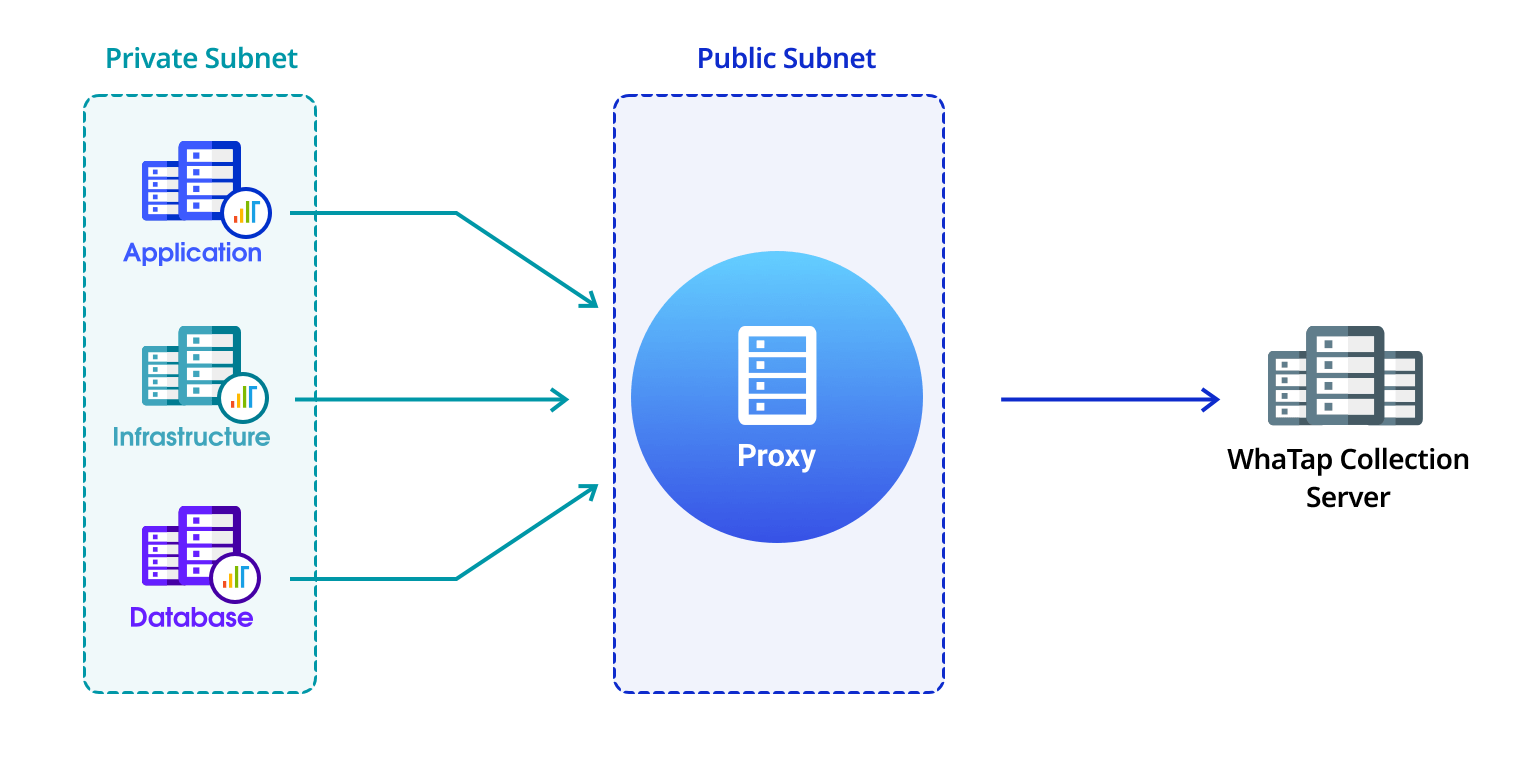
If the agent cannot directly access the collection server, use the provided proxy module to access it.
Mobile app
The WhaTap mobile app supports both Android and iOS environments. You can install the WhaTap app by following the link or scanning the QR code. For detailed information about the mobile app, see the following.
| iOS | Android |
|---|---|
 iOS 12 or later |  Android 5.0 or later |