Member Roles
This guide describes the types of roles that can be assigned to members at the project, group, and organization levels, and how to change them.
For information on hierarchical structure and role inheritance, see Project Overview.
Role Types
| Role Type | Description |
|---|---|
| View | Granted by default when a member is invited. Allows viewing Dashboard and other menu pages. |
| Edit | Allows adding/modifying/deleting Dashboard, moving/modifying/deleting groups and projects, registering/modifying/deleting maintenance plans, and using the process grouping feature of Server products. |
| Member management | Allows adding and deleting members and editing roles at the organization, group, and project levels. At least one member must have this role. |
| Alert reception | Allows managing alert reception settings in the Alert > Notification setting menu. Without this role, you can only change the reception settings for your own account. |
| Alert settings | Allows adding/modifying/deleting alerts, registering/modifying/deleting maintenance plans, and using the process grouping feature of Server products. |
| View log | Granted by default when a member is invited. Allows access to the Log menu, the log tab in event settings, the transaction log tab, and the container map log tab. |
| Personal information query in log | Allows viewing personal information included in logs (unmask). For more details, see the description below. |
| Log edit | Allows editing settings in the Log > Log setting menu. Not available if the access key has not been issued or log monitoring is disabled. |
| Project flexboard update | Allows access to Edit Mode, Admin mode, and Filter features in the Flex board menu of the project. |
| BILLING | Allows billing at the organization, group, or project level. For more details, see the description below. |
-
The maintenance plan settings require the Edit or Alert settings role. For more details, see Maintenance Plan.
-
The process grouping feature of Server products requires the Edit or Alert settings role. For more details, see Process Grouping.
-
For more details on Flex Board, see Flex Board.
Log Personal Information View
WhaTap masks personal information included in logs by default.

Items classified as personal information are as follows:
- Resident registration number, passport number, driver's license number, alien registration number
- Credit card number, account number
- Biometric information
Users with the Personal information query in log role can unmask personal information by enabling the Display personal information toggle button in log-related menus.

For more details on personal information de-identification settings, see Log Settings.
Billing
-
Only one member per unit can have the Billing role, and at least one member must have it.
-
The BILLING tag is displayed next to the member with the Billing role.
-
When the Billing role is transferred, the previous member's role is automatically revoked. The transfer applies to all sub-groups and projects.
-
A verification email is sent to the receiving member, and the Billing role is finalized after approval.
-
To receive the Billing role, payment information must be registered first. You can register it in the My usage menu. For more details, see Payment Information.
-
If each level has a billing manager, billing is charged in the order of project, group, and organization. If a lower level does not have a billing manager, the billing manager of the upper level is charged.
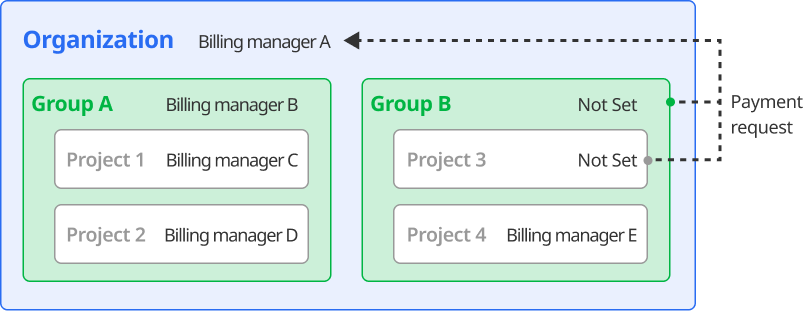
For the transfer procedure, see Transferring the billing role below.
Changing Member Roles
Changing Project Member Roles
You can change member roles from the member list of a project that does not belong to an organization or group.
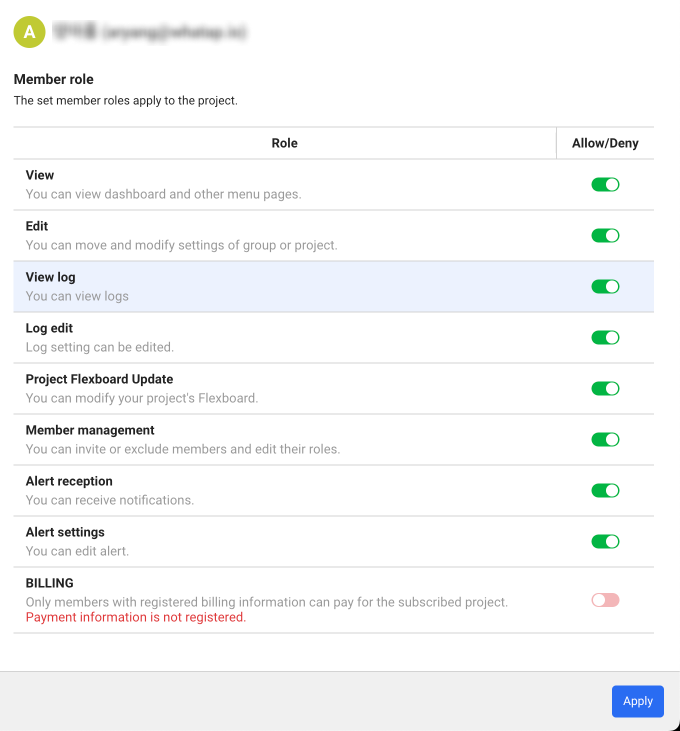
Set the roles using the toggle buttons on the right, then click the Apply button.
Changing Organization or Group Member Roles
You can change member roles for projects that belong to an organization or group.
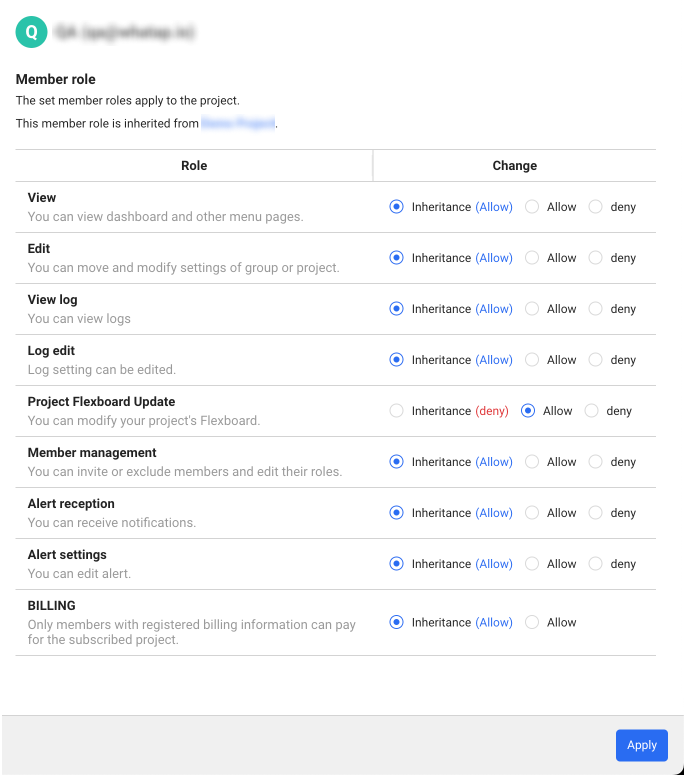
In the User role per group or User role per project of a group section, click the  button for the item whose role you want to change. When the Edit member role window appears, you can set roles with the following options:
-
Inheritance(Allow): Inherits the roles from the parent organization or group.
-
Allowed: Enables the role for the currently selected group or project.
-
deny: Disables the role for the currently selected group or project.
For more details on adding, deleting members, and changing roles, see the following documents:
Transferring the billing role
The billing permission can be granted at the organization, group, or project level, and only one person can have it. For example, when the billing role is transferred from the account A to the account B, the account A no longer has the billing role. Additionally, the payment role can be transferred to an account that has registered its payment information and completes the approval process through email verification.
Registering the payment information for the account to transfer the billing role to
-
In WhaTap monitoring service, log in with the account to transfer the billing role to.
-
Register the payment information for the account by following Payment Information.
Invite Member
-
In WhaTap monitoring service, log in with the account with the Billing and Edit roles.
-
In Home screen, select an organization, group, or project to transfer the billing role.
-
Go to the member management menu of the selected unit. For more information about the unit-level member management menu, see Moving to the member management menu.
-
Select Invite Member on the upper right of the screen.
-
Enter the email address of the account to transfer the billing role to in the email field, and then select Add.
-
Check whether the account has been registered in List of members to invite, and then select Complete.
Moving to the member management menu
The path differs by unit. Once you move to the target, the sidebar switches to that target's menu.
| Unit | How to get there | Sidebar menu |
|---|---|---|
| Organization | Select the  button next to the organization menu at the top of the side menu, then select the button next to the organization menu at the top of the side menu, then select the  button next to the organization name in the organization list panel button next to the organization name in the organization list panel | Member List |
| Group | Select the All Projects menu at the top of the side menu, then select the button next to the group name in the panel | Group Member |
| Project | Select a project | Management > Project member |
Modifying the role
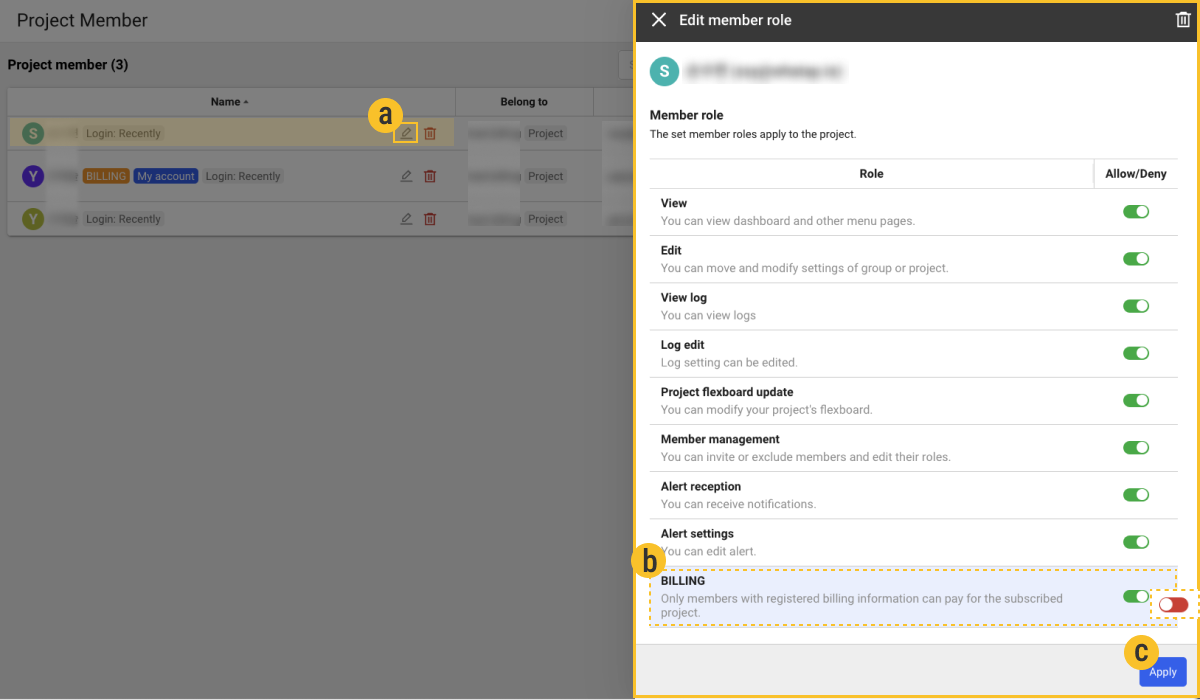
-

-
If the Edit member role window appears, among the roles, grant only
 BILLING.
 -
After enabling the BILLING role toggle, select the
 Apply button in the Edit member role window.
 -
If the payment confirmation window appears, select Apply.
-
In the Changing the payment role window, set whether to grant the same roles to the subgroups or subprojects, and then select the Apply button.

-
After checking the email sent to approve the change of payment role for the account, select the Apply button.
-
The final change in the payment role is made upon approval via email of the account to which payment role is to be changed.
-
In case of the member with the billing role, on the left of the name in the Project member list, the
Paymenttag appears. -
If you grant the payment role to another member, an approval process is required via email authentication. However, if you grant the payment role directly to another member, the approval process is omitted.
-
The Edit member role window appears differently depending on whether the project member role or the organization or group member role is modified. For more information about the member roles, see the following.