Billing and Payment History
You can check payment history, outstanding balances, and billing details. You can also view invoices at the billing email address entered in your payment information.
Select the profile icon on the upper right of the Home screen, and then select My usage > Billing History.
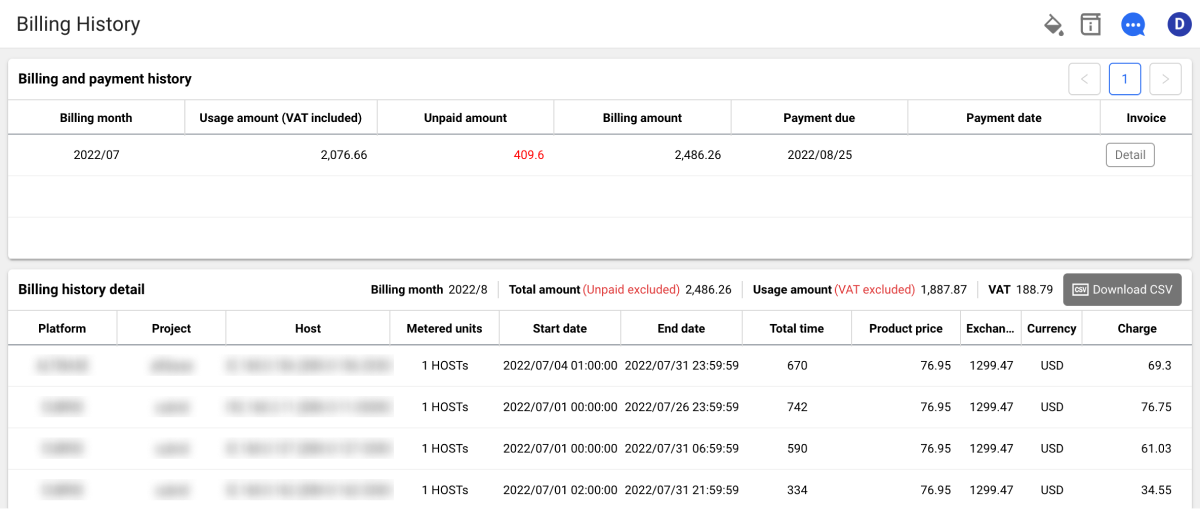
Click the Detail button in the Invoice column on the far right of the list to view the detailed information.
The WhaTap monitoring service charges on an hourly basis. The monthly base hours are calculated as the number of days in the month × 24 hours.
- 28 days: 28 × 24 = 672 hours
- 29 days: 29 × 24 = 696 hours
- 30 days: 30 × 24 = 720 hours
- 31 days: 31 × 24 = 744 hours
Prepaid Balance
If you have a prepaid balance, it is deducted first from the billed amount. To check the payment amount, payment status, and balance deduction history, select the profile icon on the upper right of the Home screen, and then select My usage > Balance.