Support Environment
Python agent-supported environment
Before installing the WhaTap Python monitoring agent, check the support environment.
Last Updated: 2026-09-07
Supported Versions
| Application Type | Python Version |
|---|---|
| WSGI Application | 3.7 ~ 3.13 |
| ASGI Application | 3.7 ~ 3.13 |
Operating System
| OS | Minimum Version | Architecture |
|---|---|---|
| Ubuntu | 12.04 | 64bit |
| Red Hat / CentOS | 6.x | 64bit |
| macOS | 10.15 Catalina | - |
| Windows | Windows Server 2008 R2, Windows 7 | 64bit |
Application Server
| Framework | Supported Version |
|---|---|
| Bottle | - |
| Celery | - |
| CherryPy | - |
| Django | - |
| FastAPI | 0.84.0 |
| Flask | - |
| Frappe | - |
| Nameko | - |
| Odoo | v14 ~ v19 |
| Tornado | - |
Libraries
| Category | Libraries |
|---|---|
| External Calls | HttpLib, HttpLib2, Requests, Urllib, HTTPX, HTTPX2 |
| Data Processing | SQL Alchemy, GraphQL |
| Logging | smtplib, logging, loguru |
| Messaging | Kombu, Pika |
| LLM SDK | OpenAI, Anthropic, Amazon Bedrock |
| Agent Orchestration | Hermes, LangGraph |
Database
| Database | Driver |
|---|---|
| MongoDB | pymongo |
| MySQL | MySQLdb, pymysql |
| Neo4j | neo4j |
| Oracle | cxOracle |
| PostgreSQL | psycopg2, psycopg, psycopg_pool |
| Redis | redis |
| SQLite | sqlite3 |
Common supported environment
Service deployment models
You can use WhaTap Monitoring as a SaaS or on-premises (self-hosted) service. Whichever you choose, you use the same agents and the same monitoring features.
| Deployment | Support | Description |
|---|---|---|
| SaaS | ✅ | Connects to collection servers operated by WhaTap. See the firewall section for regional addresses |
| On-premises (self-hosted) | ✅ | Collection servers you build and operate yourself (air-gapped environments supported). Contact your sales representative for the scope |
You can also deploy WhaTap on-premises in air-gapped environments without internet connectivity.
Feature differences by deployment model
Whichever you choose, the monitoring features are the same. The mobile app is the only exception and is available on the service.whatap.io SaaS service only.
To use certain features on-premises, a separate agreement is required.
Supporting the browser
WhaTap Monitoring is available in web browsers and mobile Apps.
| Browser | Recommended | Supported version |
|---|---|---|
| Google Chrome | ✅ | 111 or later |
| Mozilla FireFox | ❌ | Latest version |
| Edge | ❌ | Latest version |
| Safari | ❌ | Latest version |
Support guidance
- For browser compatibility and performance reasons, the latest version of Chrome is recommended.
- The user interface (UI) is implemented using HTML5 standard technologies, so Internet Explorer is not supported.
Limitations
WhaTap’s web interface does not support mobile browsers. To access WhaTap on a mobile device, install the WhaTap app for Android or iOS. The WhaTap mobile app is optimized for mobile environments. For more information about the WhaTap mobile app, see this document.
Firewall
The WhaTap agent must be able to access the collection server through TCP port 6600. Allow access to the collection server address that is closest to the monitored target.
Source: WhaTap agent
| Cloud | Destination | Destination IP | Port |
|---|---|---|---|
| AWS | WhaTap collection server (Seoul) | 13.124.11.223 / 13.209.172.35 | TCP 6600 |
| WhaTap collection server (Tokyo) | 52.68.36.166 / 52.193.60.176 | TCP 6600 | |
| WhaTap collection server (Singapore) | 18.138.0.93 / 18.139.67.236 | TCP 6600 | |
| WhaTap collection server (Jakarta) | 108.136.91.69 / 108.137.158.44 | TCP 6600 | |
| WhaTap collection server (Thailand) | 43.209.109.219 / 43.209.48.86 | TCP 6600 | |
| WhaTap collection server (Mumbai) | 13.127.125.69 / 13.235.15.118 | TCP 6600 | |
| WhaTap collection server (California) | 52.8.223.130 / 52.8.239.99 | TCP 6600 | |
| WhaTap collection server (Virginia) | 107.23.220.101 / 54.236.221.105 | TCP 6600 | |
| WhaTap collection server (Frankfurt) | 3.125.142.162 / 3.127.76.140 | TCP 6600 | |
| Azure | WhaTap collection server (Seoul) | 52.231.66.38 / 20.194.5.115 | TCP 6600 |
| WhaTap collection server (Tokyo) | 52.246.169.54 / 20.210.27.232 | TCP 6600 | |
| Kakao | WhaTap collection server (Seoul) | 61.109.237.237 / 61.109.238.166 | TCP 6600 |
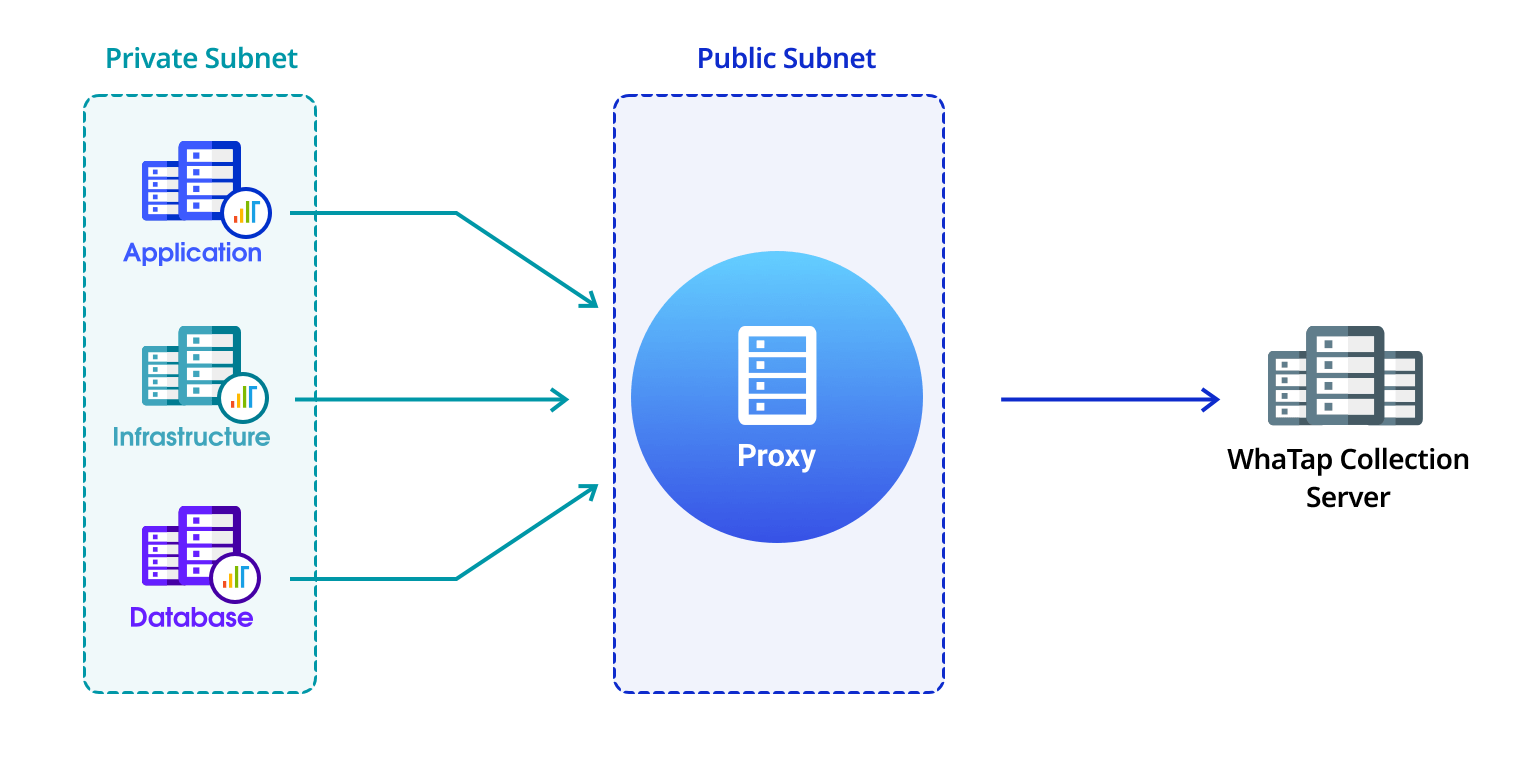
If the agent cannot directly access the collection server, use the provided proxy module to access it.
Mobile app
The WhaTap mobile app supports both Android and iOS environments. You can install the WhaTap app by following the link or scanning the QR code. For detailed information about the mobile app, see the following.
| iOS | Android |
|---|---|
 iOS 12 or later |  Android 5.0 or later |