General Config
In General Config, you can set the polling interval for each NMS manager. Configure the global intervals for SNMP polling, ICMP/TCP/HTTP health checks.
Basic screen and settings
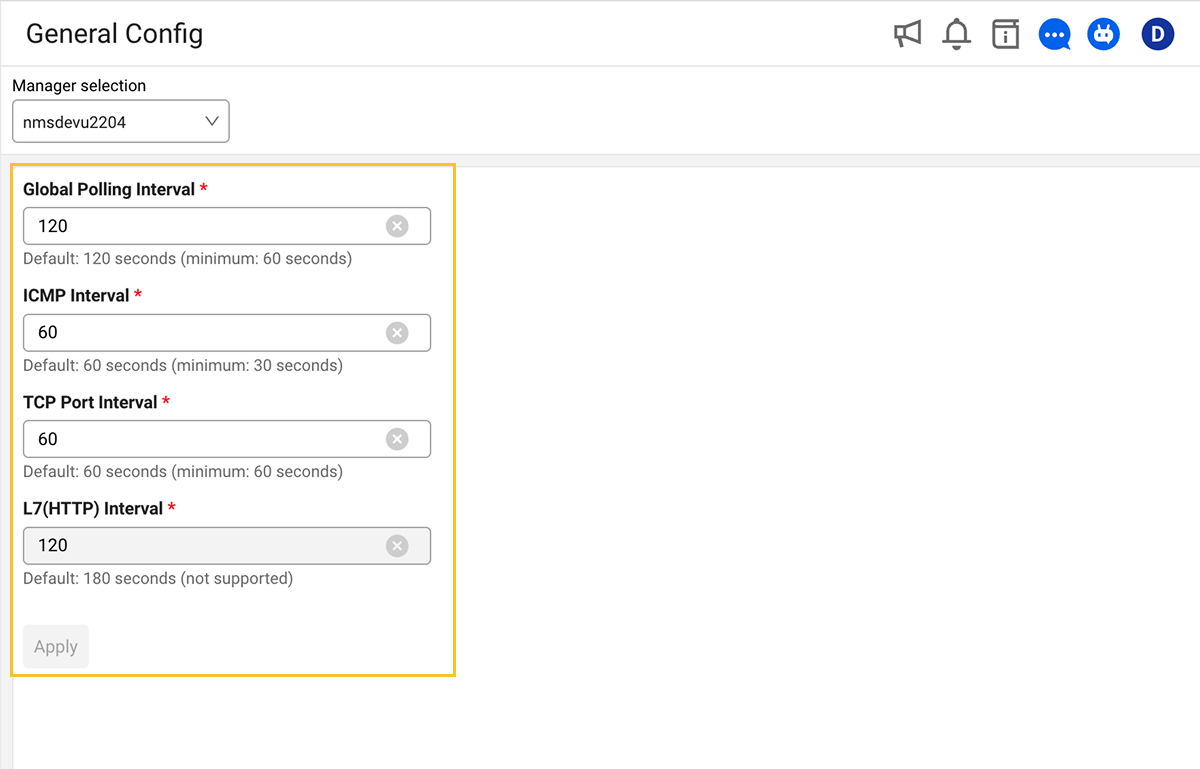
-
At the top of the General Config screen, select the manager to apply the settings to.
-
Configure the data collection interval for the selected NMS manager. For details, see Polling interval settings.
-
Click the Apply button to save the changed settings. The button is disabled if there are invalid values or no changes have been made.
Save conditions
-
All fields must have valid values.
-
At least one field must be changed.
-
On successful save, the form is reset to the new values.
Polling interval settings
| Field | Description | Default | Minimum |
|---|---|---|---|
| Global Polling Interval | Default interval for SNMP data collection | 120 sec | 60 sec |
| ICMP Interval | ICMP Ping health check interval | 60 sec | 30 sec |
| TCP Port Interval | TCP port health check interval | 60 sec | 60 sec |
| L7(HTTP) Interval | HTTP health check interval (not currently supported) | 180 sec | 180 sec |
L7(HTTP) Interval is not supported in the current version. The field is displayed as read-only.
Input rules
-
Each field accepts numbers only.
-
If a value below the minimum is entered, saving is disabled.
-
The default and minimum values are displayed as guide text below each field.
Features planned for future support
The following features are scheduled to be supported in future updates. The timing and details are subject to change.
- L7(HTTP) Interval setting: Change the HTTP health check interval
- Reset button: Cancel changes and restore original values
- Data retention settings: Configure retention period for metric/log data
- Alert threshold settings: Configure global alert thresholds