Support Environment
WhaTap Network Control Management System is installed on a standalone virtual machine (VM) in a standalone manner. This allows the network management system to operate independently and reliably provide all the features required for network monitoring and management.
System requirements
The following are the recommended minimum specifications to ensure stable performance of the WhaTap Network Management System.
| Item | Specification |
|---|---|
| CPU | 4 core (minimum 2 core) |
| Memory | Minimum 16GB or more (minimum 8G) |
| Disk | 50G or more SSD recommended (minimum 30G) |
| Network Interface | 1Gbps or more |
OS support
| OS | Python version | Support status |
|---|---|---|
| Ubuntu 22.04 | 3.10 | Supported, Recommended |
| Ubuntu 23.04 | 3.11 | Supported |
| Ubuntu 24.04 | 3.12 | Supported |
| Rocky 9.4 | 3.9 | Supported, Recommended |
| Rocky 8.10 | 3.11 | Supported |
| Redhat 8.10 | 3.11 | Supported, Recommended |
Python version support
Support is available depending on the Python version regardless of the OS type. However, it is recommended to use the recommended OS whenever possible.
| Family | Supported Python versions |
|---|---|
| Debian family | Python 3.10, 3.11, 3.12 |
| Redhat family | Python 3.9, 3.10, 3.11, 3.12 |
TCP/UDP ports used
The specified TCP and IP port numbers are the default ports used by the service and can be changed to suit the customer's environment.
| Category | TCP | UDP | Description | Direction | Notes |
|---|---|---|---|---|---|
| SNMP | - | 161 | polling | Outbound | Default port |
| SNMP Trap | - | 162 | trap message | Inbound | Default port |
| syslog | - | 514 | syslog message | Inbound | Default port |
| manager U/I | 5000(http) 8443(https) | - | NMS Control Manager GUI | Inbound | Default http, requires port 8443 permission when using https |
| whatap collection server | 6600 | - | Data transmission | Outbound | - |
| ICMP | - | - | ICMP health Check | - | ICMP protocol permission required |
| TCP | - | - | TCP-based health Check | In/Out | Monitoring target TCP port number connection permission required (Options) |
Service deployment models
You can use WhaTap Monitoring as a SaaS or on-premises (self-hosted) service. Whichever you choose, you use the same agents and the same monitoring features.
| Deployment | Support | Description |
|---|---|---|
| SaaS | ✅ | Connects to collection servers operated by WhaTap. See the firewall section for regional addresses |
| On-premises (self-hosted) | ✅ | Collection servers you build and operate yourself (air-gapped environments supported). Contact your sales representative for the scope |
You can also deploy WhaTap on-premises in air-gapped environments without internet connectivity.
Feature differences by deployment model
Whichever you choose, the monitoring features are the same. The mobile app is the only exception and is available on the service.whatap.io SaaS service only.
To use certain features on-premises, a separate agreement is required.
Firewall
The WhaTap agent must be able to access the collection server through TCP port 6600. Allow access to the collection server address that is closest to the monitored target.
Source: WhaTap agent
| Cloud | Destination | Destination IP | Port |
|---|---|---|---|
| AWS | WhaTap collection server (Seoul) | 13.124.11.223 / 13.209.172.35 | TCP 6600 |
| WhaTap collection server (Tokyo) | 52.68.36.166 / 52.193.60.176 | TCP 6600 | |
| WhaTap collection server (Singapore) | 18.138.0.93 / 18.139.67.236 | TCP 6600 | |
| WhaTap collection server (Jakarta) | 108.136.91.69 / 108.137.158.44 | TCP 6600 | |
| WhaTap collection server (Thailand) | 43.209.109.219 / 43.209.48.86 | TCP 6600 | |
| WhaTap collection server (Mumbai) | 13.127.125.69 / 13.235.15.118 | TCP 6600 | |
| WhaTap collection server (California) | 52.8.223.130 / 52.8.239.99 | TCP 6600 | |
| WhaTap collection server (Virginia) | 107.23.220.101 / 54.236.221.105 | TCP 6600 | |
| WhaTap collection server (Frankfurt) | 3.125.142.162 / 3.127.76.140 | TCP 6600 | |
| Azure | WhaTap collection server (Seoul) | 52.231.66.38 / 20.194.5.115 | TCP 6600 |
| WhaTap collection server (Tokyo) | 52.246.169.54 / 20.210.27.232 | TCP 6600 | |
| Kakao | WhaTap collection server (Seoul) | 61.109.237.237 / 61.109.238.166 | TCP 6600 |
If the agent cannot directly access the collection server, use the provided proxy module to access it.
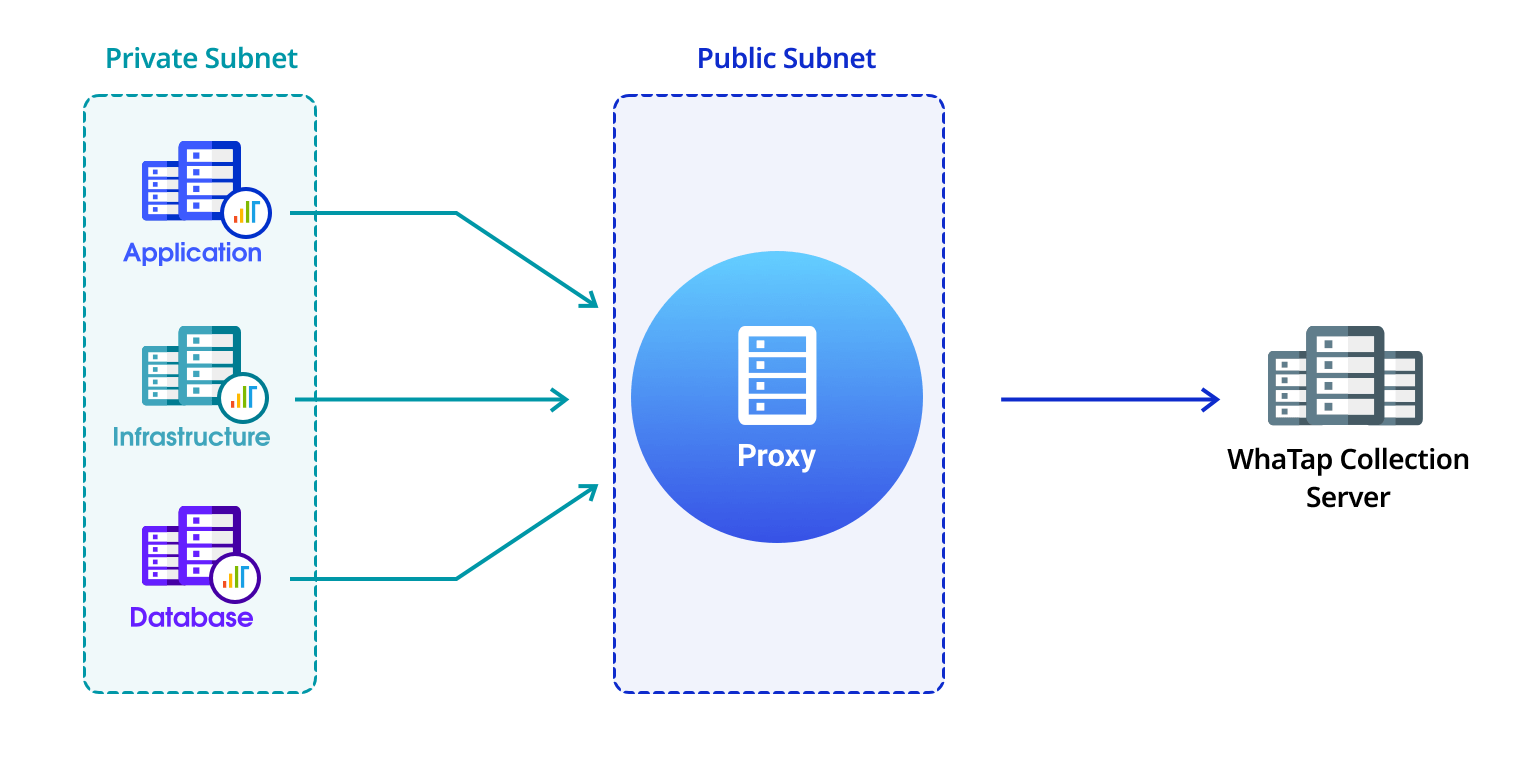
Main service components and ports
NMS Control Manager Web-Based U/I
uvicorn.service is a management UI and API service that runs in a local environment, providing overall operational management functions such as NMS configuration management, system status check, and configuration backup and recovery.
-
Ports used: HTTP 5000, HTTPS 8443 (when configured)
-
Service start and stop: You can start, stop, or restart
uvicorn.servicewith the following command.systemctl {start|restart|stop} uvicorn.service
Please contact the WhaTap technical team for manager access information.
NMS engine
nmscore.service is a service that acts as the engine of the Network Management System (NMS). It provides network device and traffic monitoring, management, and event processing functions.
-
Ports used:
- SNMP Trap: UDP 162 (default)
- Syslog: UDP 514 (default)
-
Service start and stop: You can start, stop, or restart
nmscore.servicewith the following command.systemctl {start|restart|stop} nmscore.service
Health Check
icmptcphealthd.service performs ICMP and TCP-based Health Check on network devices and continuously monitors device availability and connection status through periodic status checks.
-
Service start and stop: You can start, stop, or restart
icmptcphealthd.servicewith the following command.systemctl {start|restart|stop} icmptcphealthd.service