Deadlock
Dead lock
Home > Select Project > Analysis > Dead Lock
A deadlock occurs when multiple processes or transactions block each other from processing by locking database resources (tables or rows). Frequent deadlocks cause inconvenience to end users and reduce the service quality. In the Dead Lock menu, you can see the time and related data when the deadlock occurred. This information can help you identify and solve problems in the application design.
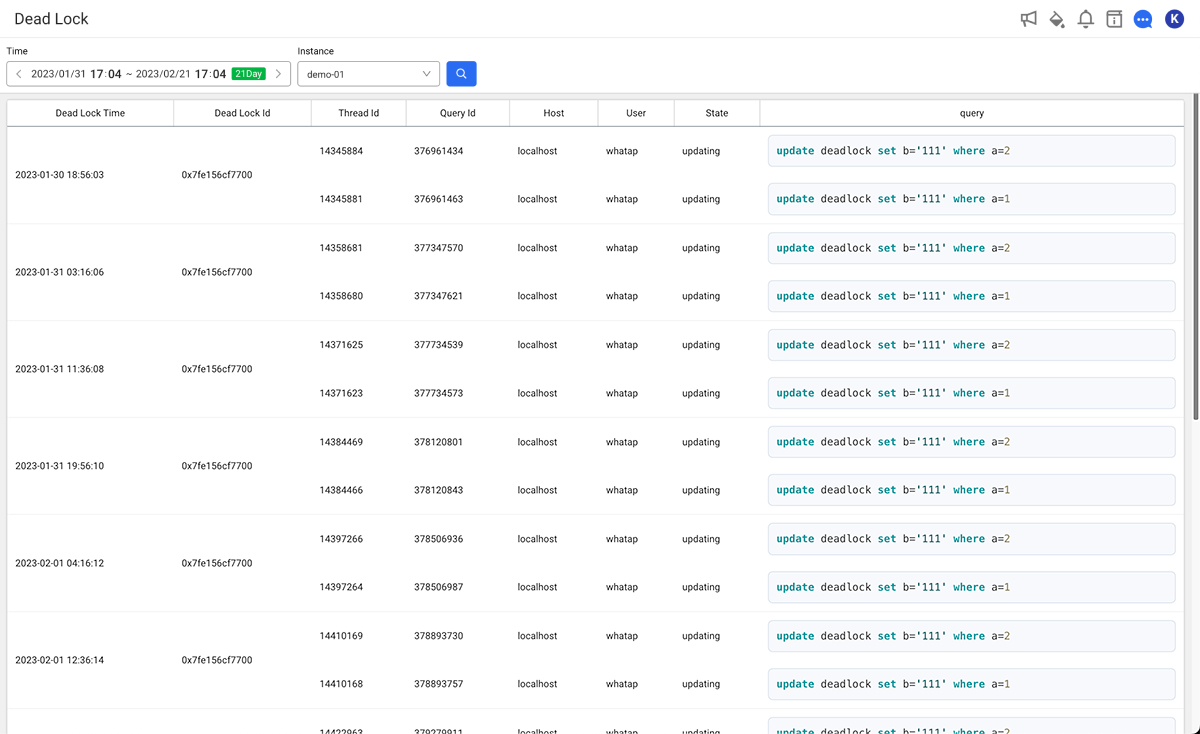
You can check information about deadlocks that have occurred in the database.
-
Set the time to search in Time.
-
Select an instance name to view in Instance.
-
Select
 .
.
It provides deadlock information in the form of table.
- The query time can be set up to 3 weeks.
Deadlock Collection
Collection Method
The agent periodically runs the SHOW ENGINE INNODB STATUS command to collect deadlock information. Due to the nature of this command, only the most recent deadlock can be retrieved. If the collected information is identical to the previous one, it is not stored again.
Collection Interval
By default, information is collected every hour. You can change this interval with the following agent option:
- deadlock_interval (Int)
Default:60(unit: minutes)
Sets the interval for collecting deadlock information. Only the last deadlock that occurred during the interval is collected.
For more details on data collection settings, see the following.
Alarm Settings
You can configure alerts for deadlock occurrences. However, since deadlock data is checked at the deadlock_interval, alerts are not triggered in real time but are sent based on deadlocks detected at each interval.
Analyzing with AI
Click the WhaTap AI button on the screen to open the WhaTap AI chat window, where the queried screen data is summarized and the analysis result is shown as a conversation. After reading the result, you can continue with follow-up questions in the same conversation.
-
The data used for the analysis is the 15 most recent entries in the queried deadlock history.
-
The analysis target is the data queried on the screen. If you change the query conditions and analyze again, the analysis is based on the changed data.
-
The conversation history is recorded in the
AI Analysis - {screen name}format.