OpenAgent Configuration
OpenAgent is an agent that collects metrics from Prometheus endpoints and transmits them to the WhaTap server. The configuration required for agent operation is separated into two files.
-
whatap.conf: Basic agent configuration (license, server address, log level, etc.)
-
scrape_config.yaml: Collection target (Prometheus endpoint) definition
The agent uses environment variables to locate and load configuration files. Without separate configuration, the agent looks for the whatap.conf file in the current working directory. Since it checks for changes to the whatap.conf file and reloads it once every 5 seconds, most configuration changes can be applied without restarting the agent.
For user convenience, the WhaTap monitoring service also provides agent configuration functionality.
For OpenAgent installation instructions, refer to the OpenAgent Installation documentation.
Basic configuration
whatap.conf
OpenAgent requires at minimum a license key and server address to be configured to operate.
license=xxxxxxxxxxxxx-xxxxxxxxxx-xxxxxxxxxxxxx
whatap.server.host=10.10.0.1
whatap.server.port=6600

# Log level: DEBUG(0), INFO(1), WARN(2), ERROR(3)
log_level=INFO
debug=false
OpenAgent supports receiving the same configuration value in multiple key formats. Configuration can be set either through environment variables or whatap.conf, with file values taking priority and environment variable values used when absent.
| Setting | Key | Environment Variable | Default |
|---|---|---|---|
| License key | license, WHATAP_LICENSE | WHATAP_LICENSE | (required) |
| Server host | whatap.server.host, WHATAP_HOST | WHATAP_HOST, WHATAP_SERVER_HOST | (required) |
| Server port | whatap.server.port, WHATAP_PORT | WHATAP_PORT, WHATAP_SERVER_PORT | 6600 |
| Agent name | whatap.oname, app_name | WHATAP_ONAME | Auto-generated |
Configuration file path
OpenAgent uses the following environment variables to identify the configuration file location and agent home directory.
- WHATAP_HOME: Directory containing the
whatap.conffile. Default is the current directory (.) - WHATAP_OPEN_HOME: OpenAgent's runtime home directory (storage location for log files, etc.)
If environment variables are not set, the agent looks for the whatap.conf file relative to the directory where it is running.
export WHATAP_HOME=/app/whatap
export WHATAP_OPEN_HOME=/app/whatap
./openagent
Server connection and data transmission
OpenAgent connects a TCP session to the server address configured in whatap.conf.
whatap.server.host=10.10.1.1
whatap.server.port=6600
- When a TCP session is connected, a communication key is received from the server using the license. If an incorrect license is configured, the server terminates the session.
- If TCP connections are repeatedly terminated, check for firewall issues or verify that the license value is correct.
- When a TCP session is connected, data is transmitted via secure communication based on the secret key received from the server.
- Listing multiple server addresses separated by
/or,is used for failover purposes.
whatap.server.host=10.10.1.1/10.10.1.2
Log level configuration
Logs can be controlled with log_level or debug settings. When both settings are present, log_level takes priority.
log_level=INFO   # DEBUG(0) | INFO(1) | WARN(2) | ERROR(3)
debug=false      # Setting to true operates at DEBUG level
The log level is also subject to whatap.conf reloading, so changes are applied without restarting the agent.
Scraping target configuration (scrape_config.yaml)
Prometheus endpoint collection, the core operation of OpenAgent, is defined in the $WHATAP_HOME/scrape_config.yaml file. The following 3 target types are supported.
- PodMonitor: Dynamic discovery using Pod label selectors (Kubernetes)
- ServiceMonitor: Dynamic discovery using Service label selectors (Kubernetes)
- StaticEndpoints: Directly enter fixed IP addresses and ports
Changes to the scrape_config.yaml file are automatically detected when modified, and agent restarts are not required.
StaticEndpoints basic example
features:
  openAgent:
    enabled: true
    targets:
      - targetName: dcgm-exporter
        type: StaticEndpoints
        enabled: true
        endpoints:
          - address: "192.168.49.2:30400"
            path: "/metrics"
            scheme: "http"
            interval: "30s"
            metricRelabelConfigs:
              - source_labels: [__name__]
                regex: "DCGM.*"
                action: keep
PodMonitor example (Kubernetes)
features:
  openAgent:
    enabled: true
    globalInterval: "60s"
    globalPath: "/metrics"
    targets:
      - targetName: my-app-pod-metrics
        type: PodMonitor
        namespaceSelector:
          matchNames: ["production"]
        selector:
          matchLabels:
            app: my-app
        endpoints:
          - port: "web-metrics"
            path: "/metrics"
            interval: "15s"
            scheme: "http"
            timeout: "10s"
StaticEndpoints configuration elements
| Option | Description |
|---|---|
targetName | Target identifier |
type | Target type ("StaticEndpoints") |
address | IP:PORT or HOSTNAME:PORT |
path | Metrics path (default: /metrics) |
scheme | Protocol (http or https, default: http) |
interval | Collection interval (default: 60s) |
metricRelabelConfigs | Metric relabeling configuration |
params query parameter configuration
Query parameters can be added to the URL during HTTP scraping. Useful when integrating with external services such as Azure Monitor Exporter.
Azure Monitor style example
endpoints:
  - address: "192.168.49.2:30400"
    path: "/metrics"
    scheme: "http"
    interval: "30s"
    params:
      subscription: ["50d91b57-a280-45b5-8d7c-be8005662738"]
      resourceGroup: ["WhaTap-Data-KR-MID"]
      target: ["/subscriptions/50d91b57-a280-45b5-8d7c-be8005662738/resourceGroups/WhaTap-Data-KR-MID/providers/Microsoft.Sql/managedInstances/openmetrics-instance-01"]
      metric: ["avg_cpu_percent,virtual_core_count,memory_usage_percent"]
      interval: ["PT1M"]
      aggregation: ["average"]
Simple parameter example
params:
  format: "prometheus"
  version: "v1"
  debug: true
Metric relabeling (metricRelabelConfigs)
Provides metric relabeling functionality similar to Prometheus metric_relabel_configs.
| Item | Description |
|---|---|
| source_labels | List of source labels (array) |
| separator | Delimiter for concatenating source label values (default: ;) |
| target_label | Target label |
| regex | Regular expression to apply to source labels |
| replacement | Replacement value (regex capture group references possible: ${1}) |
| action | Action to perform (keep, drop, replace) |
Supported action types
- keep: Retain only metrics matching the regex
- drop: Remove metrics matching the regex
- replace: Replace the target label value with the replacement value
Special labels
__name__: Special label representing the metric name
Relabeling examples
Example 1: Collect all metrics
metricRelabelConfigs:
  - source_labels: [__name__]
    regex: ".*"
    action: keep
Example 2: Retain specific metrics only
metricRelabelConfigs:
  - source_labels: [__name__]
    regex: "http_requests_total"
    action: keep
Result: Only the http_requests_total metric is retained and the rest are removed.
Example 3: Filtering using regular expressions
metricRelabelConfigs:
  - source_labels: [__name__]
    regex: "node_(cpu|memory).*"
    action: keep
Result: Only metrics starting with node_cpu or node_memory are retained.
Example 4: Renaming labels
metricRelabelConfigs:
  - source_labels: [method]
    target_label: http_method
    replacement: "${1}"
    action: replace
Result: The value of the method label is copied to the http_method label.
Example 5: Combining multiple source labels
metricRelabelConfigs:
  - source_labels: [__name__, status]
    regex: "http_requests_total;(200|500)"
    action: keep
Result: Only metrics from http_requests_total where status is 200 or 500 are retained.
Example 6: Adding static labels
metricRelabelConfigs:
  - target_label: metric_src
    replacement: "whatap-open-agent"
    action: replace
Result: The metric_src="whatap-open-agent" label is added to all metrics.
Managing configuration files for multiple OpenAgent instances
When multiple OpenAgent instances need to be operated on one server, separate the home directory for each instance and specify different WHATAP_HOME environment variables.
# Instance A
WHATAP_HOME=/app/whatap/serviceA ./openagent standalone

# Instance B
WHATAP_HOME=/app/whatap/serviceB ./openagent standalone
Placing separate whatap.conf and scrape_config.yaml files in each home directory allows independent configuration to be maintained per instance.
pprof profiling endpoints
When performance analysis is needed, runtime information can be checked through the pprof HTTP server.
export PPROF_PORT=6060   # Default: 6060
./openagent standalone
Available endpoints are as follows.
http://localhost:6060/debug/pprof/profile- CPU profilehttp://localhost:6060/debug/pprof/heap- Heap profilehttp://localhost:6060/debug/pprof/goroutine- Goroutine profile
Configuring agents from the service screen
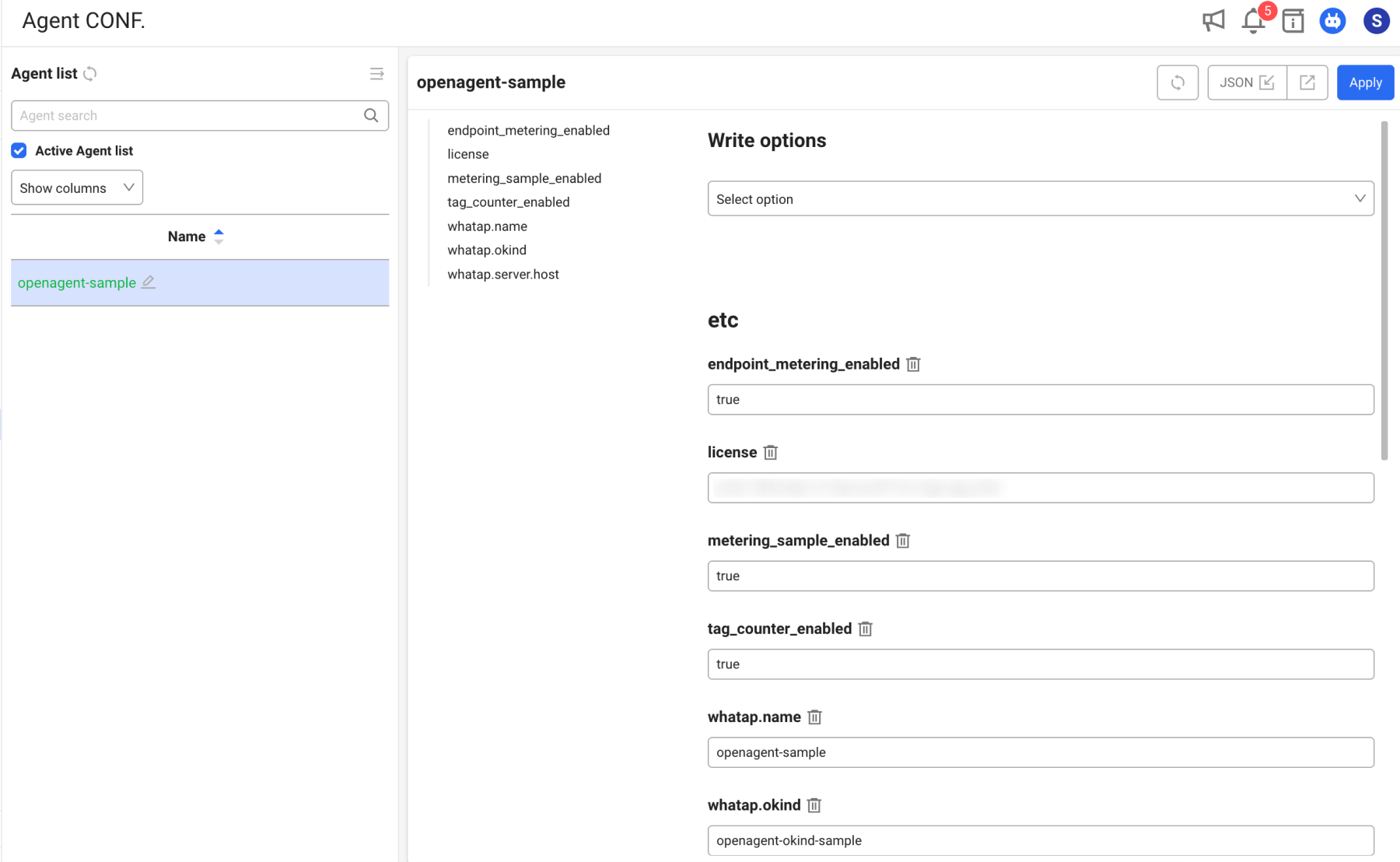
Management > Agent CONF.
Without directly modifying the whatap.conf file on the monitored server, you can add, modify, or delete agent configuration options from the WhaTap monitoring service. You can also download the whatap.conf file by clicking the configuration file download button.
- This feature is available only to members with modification permissions. Members without modification permissions can only view the configuration.
- The formats available for option values are as follows.
- For Boolean type values, select
trueorfalse. - For numeric type values, only numbers can be entered.
- When entering or modifying text (String) type values, check the option description carefully.
- For Boolean type values, select
Depending on the options added, modified, or deleted, the agent may need to be restarted. For OpenAgent, most whatap.conf values are automatically reloaded within 5 seconds.
Adding options
-
Select the agent to which you want to add options from the agent list.
-
Select the option item to add in option configuration.
-
You can find options to add in the search field. Entering text filters matching options.
-
Selecting direct input allows you to enter the option key and value.
-
-
Check the description and default value for the selected option key, then enter the configuration value.
-
Once all desired options have been added, select the Apply button in the upper right of the screen.
Selecting the Apply button without entering any option value deletes the corresponding option. Options already added cannot be selected from the option list. Available option keys may differ depending on the application type and agent version.
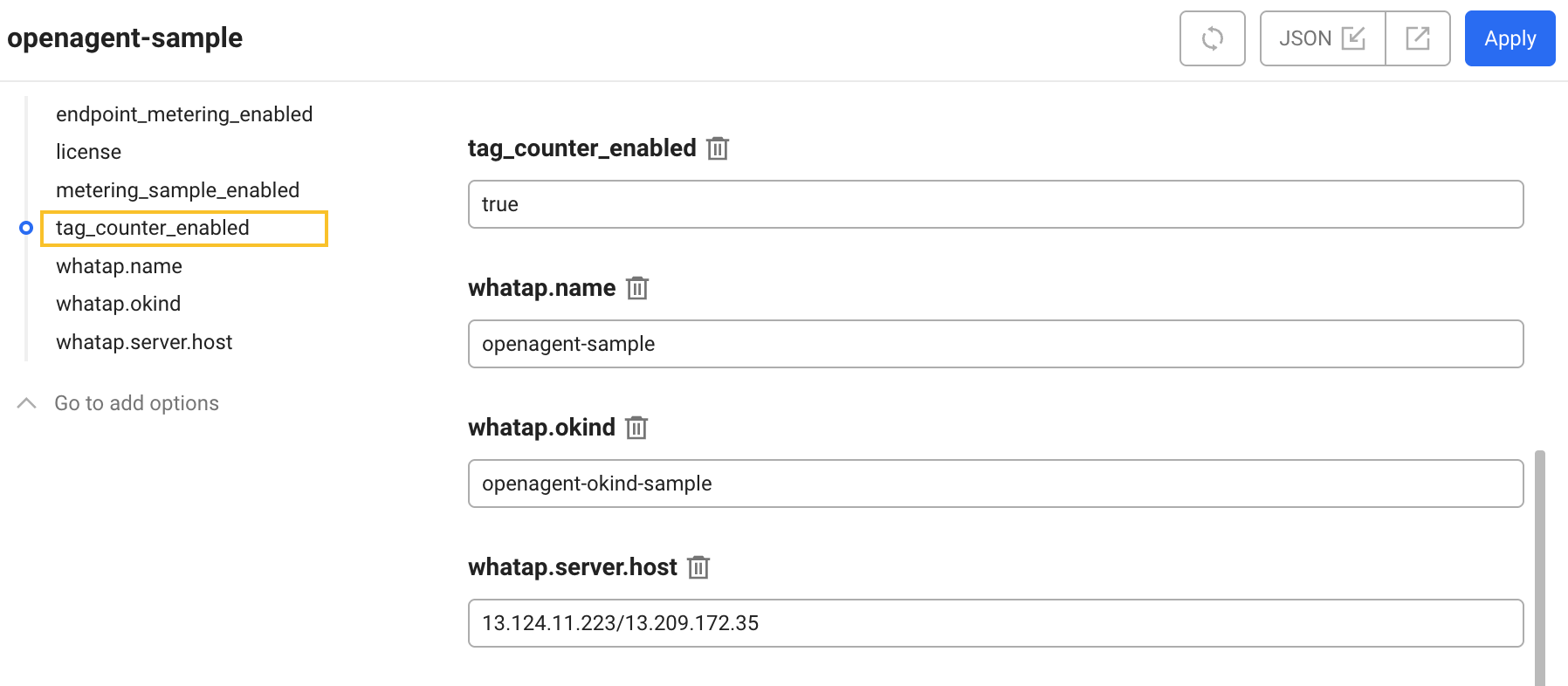
Modifying or deleting options
-
Scroll up/down on the screen or select the option to modify or delete from the option list.
-
Select or modify the desired value for the option to change. To delete an option, select the delete icon button.
-
To apply the changes, select the Apply button.
Applying to multiple agents simultaneously
You can simultaneously apply changed options to multiple OpenAgents in a project.
-
Selecting the multi-agent apply checkbox in the upper right of the screen generates checkboxes for each option item.
-
Select the checkboxes for the options you want to apply simultaneously.
-
Select the Apply button in the upper right of the screen.
-
When the agent apply window appears, select the agents to which you want to apply the changed options, then select the Apply button.
Agent configuration options guide
The main whatap.conf options available in OpenAgent are as follows.
| Option | Type | Default | Description |
|---|---|---|---|
license / WHATAP_LICENSE | string | (required) | WhaTap project license key |
whatap.server.host / WHATAP_HOST | string | (required) | WhaTap collection server address. Multiple addresses can be specified with / or , |
whatap.server.port / WHATAP_PORT | integer | 6600 | WhaTap collection server port |
whatap.oname / WHATAP_ONAME | string | Auto-generated | Agent object name |
app_name | string | - | Used as substitute when whatap.oname is not set |
debug | boolean | false | Enable debug logging |
log_level | string / integer | INFO | Log level (DEBUG / INFO / WARN / ERROR or 0 ~ 3) |
tag_counter_enabled | boolean | false | Enable when using OpenMetrics project as a standalone product |
scrape_interval | string | 60s | Global default scraping interval (backward-compatible key separate from globalInterval in scrape_config.yaml) |
scrape_timeout | string | - | Global default scraping timeout |
Set the tag_counter_enabled option to true only when the OpenMetrics project is operated as a standalone product without integration with other WhaTap products. Do not use it in the default configuration.
Available option keys may differ depending on the application type and agent version. For options related to collection target configuration, refer to the Scraping target configuration section above.