Database
Home > Select project >
Alert > Event Configuration
classic
Alert notifications are sent by configuring event conditions for each database metric. By entering threshold values per metric, notifications can be sent at Critical and Warning levels.
Default options
You can configure event conditions based on key metrics of the database instance.
- Instance: The database agent for which event conditions are configured
- Database: The target database to monitor
- Inactive agent alert: Sends an alert when no response is received from the agent after the configured time
| Item | Description |
|---|---|
| Metrics | Database metrics used to define event conditions |
| Critical | Threshold for the Critical level |
| Warning | Threshold for the Warning level |
| Detection count | The number of consecutive times the metric exceeds the threshold while being collected every 5 seconds - Example: If set to 3, an alert is triggered when the condition is met for 5 seconds × 3 consecutive times |
| Send notification when event is resolved | Sends an additional notification when the event state is recovered after occurring - Supported in DBX agent version 1.6.30 or later |
 | Delete event |
 | Enable or disable the event - Enabled: An event occurs when conditions are met - Disabled: The event does not operate and conditions are not evaluated |
Add event
Based on the selected Metrics item, you can configure alerts to be sent when the entered Critical and Warning conditions are met for the specified Detection count.
-
Navigate to Alert > Event Configuration
classic. -
Select the agent for which you want to configure alerts under Instance.
-
Click the [ + Add event ] button.
-
Select the desired metric from Metrics.
-
Choose a comparison operator (
<,≤,>,≥) for Critical and Warning, then enter values.- An alert is triggered when the configured value is exceeded.
-
Enter the desired value for Detection count.
- An alert is triggered when the condition occurs consecutively at 5 second intervals for the specified count.
- Example: If the detection count is 3
5 seconds (1st) - 5 seconds (2nd) - 5 seconds (3rd) → Total 15 seconds → Alert sent
-
If Send notification when event is resolved is enabled, an additional notification is sent when the event state is recovered (RECOVERED).
NoteThe Send notification when event is resolved feature is supported in DBX agent version 1.6.30 or later.
-
Enable the toggle button on the far right (
 ) to send alert notifications.
a. To delete an event, click the
icon for that event.
Copy alerts
You can copy alert events created for the currently selected instance to other instances.
-
Navigate to Alert > Event Configuration
classic. -
Click the [ Copy alerts ] button.
-
In the Copy alerts window, select the target instances. To copy to all instances, select Select all.
-
Click the [ Copy ] button to duplicate the alerts.
If you use the Copy alerts feature when the target instance already has alert events configured, the existing alert events will be deleted.
Inactive agent alert
An alert is sent when no response is received from the agent after the configured time.
-
Navigate to Alert > Event Configuration
classic. -
Under Inactive agent alert, select the desired time (
30 seconds,1 minute,2 minutes,3 minutes,5 minutes,10 minutes,30 minutes). -
Click the toggle button on the right to enable it.
- Enabled: If no data is received from the agent for the configured time, an INACTIVE MONITORING AGENT event occurs.
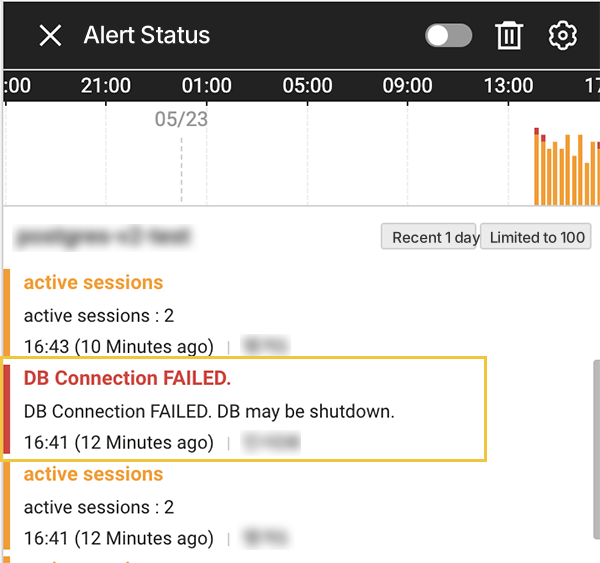
Default alert: Connection FAILED
Even without configuring event rules, an alert is sent when the agent fails to connect to the database 15 times or more. This may occur due to database shutdowns, network issues, or account or permission problems.