kube-scheduler Dashboard
Select Home > cluster project (CP) > Control Plane > kube-scheduler Dashboard
Requirements
-
The WhaTap Kubernetes agent 1.8.1 or later is required.
-
If it is a Kubernetes cluster project (
CP), you can view the corresponding menu. -
You can use this menu if the cluster can observe the vanilla Kubernetes or
kube-schedulerPods.
kube-scheduler is a major component responsible for scheduling Pods in the Kubernetes environment. WhaTap provides the kube-scheduler Dashboard to monitor the performance and scheduling status of kube-scheduler in real time. The kube-scheduler Dashboard can help you proactively prevent the cluster from entering an unschedulable state or encountering issues due to scheduler overload in advance.
Basic screen guide
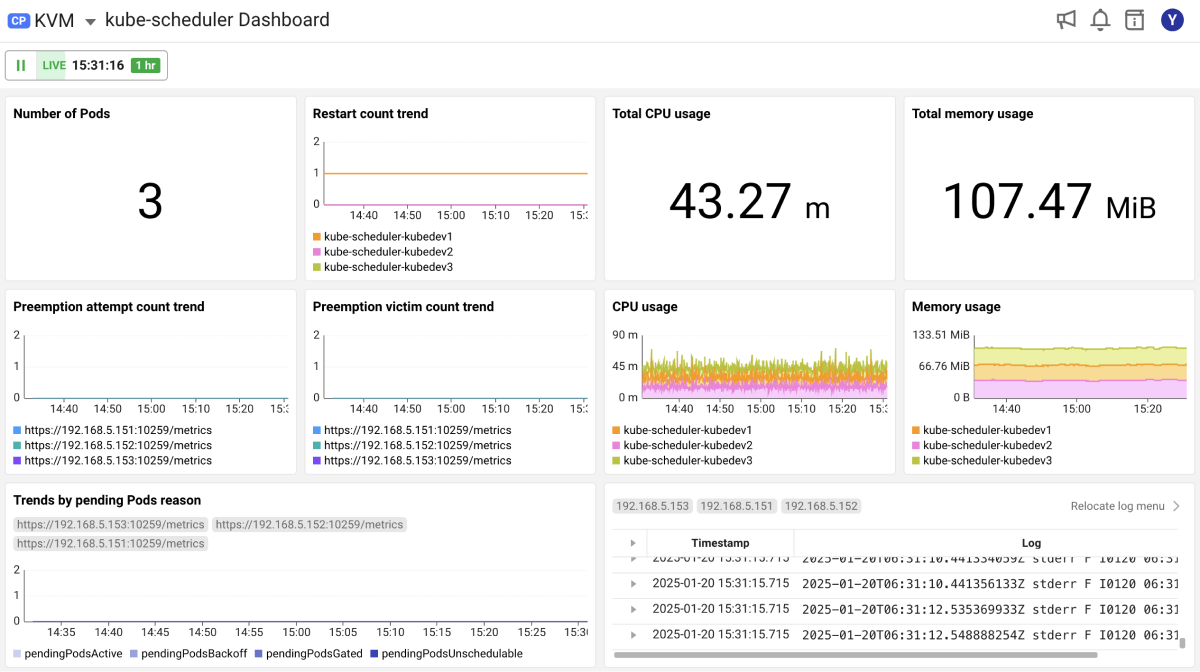
kube-scheduler Dashboard provides visualizations of key metrics collected over the past hour, broken down at 1-minute intervals. The key metrics you can see on the dashboard are as follows. For the metrics details, see the metric guide at the bottom.
-
It provides the resource usage trend, Pod restart count, and detailed logs for
kube-scheduler. -
It provides the trend for the numbers of preemption attempts by
kube-schedulerand the number of victims due to preemption. -
It provides the trends for each reason of pending Pods assigned to the pending queue inside the
kube-schedulerPod.
Enabling the kube-scheduler monitoring
Enabling requirements
-
You must be able to observe the
kube-schedulerPod via the command,kubectl get pods -n kube-system -l component=kube-scheduler. -
To enable secure communication with
kube-scheduler, change the--bind-addresssetting to be accessible from outside. Typically0.0.0.0is used.
Enabling procedure
Enabling order
-
Add the
GETrole forsecretsto RBAC of the whatap service account. -
Generate
secretsbased on the whatap service account. -
Apply the
kube-schedulermonitoring activation option to thewhatap-master-agentdeployment.
-
Role configuration
Add the
secretsresource to the resources accessible fromrulesof whatap ClusterRole inside thewhatap-monitoringnamespace. After creating the following content as a yaml file, execute thekubectl apply -f <yaml file name>.yamlcommand for application.ClusterRole.yamlapiVersion: "rbac.authorization.k8s.io/v1"
kind: "ClusterRole"
metadata:
annotations:
rbac.authorization.kubernetes.io/autoupdate: "true"
name: "whatap"
namespace: "whatap-monitoring"
rules:
- apiGroups:
- "*"
resources:
- "namespaces"
- "pods"
- "pods/log"
- "configmaps"
- "services"
- "endpoints"
- "daemonsets"
- "ingresses"
- "deployments"
- "nodes"
- "persistentvolumes"
- "persistentvolumeclaims"
- "events"
- "secrets"
- "replicasets"
- "roles"
- "rolebindings"
- "clusterroles"
- "clusterrolebindings"
- "jobs"
- "cronjobs"
- "statefulsets"
- "serviceaccounts"
- "configmaps"
- "storageclasses"
- "horizontalpodautoscalers"
- "replicationcontrollers"
verbs:
- "get"
- "list"
- "watch"
- apiGroups:
- ""
resources:
- "pods/exec"
verbs:
- "create"
- apiGroups:
- ""
resources:
- "configmaps"
verbs:
- "*"
- nonResourceURLs:
- "/metrics"
verbs:
- "*" -
Creating the secret
After creating the following content as a yaml file, execute the
kubectl apply -f yamlfilename.yamlcommand for application.secrets.yamlapiVersion: v1
kind: Secret
type: kubernetes.io/service-account-token
metadata:
name: whatap-scheduler-monitoring-token
namespace: whatap-monitoring
annotations:
kubernetes.io/service-account.name: "whatap" -
Deployment modification
After modifying the
whatap-master-agentdeployment content, execute thekubectl apply -f <yaml file name>.yamlcommand for application.-
Addition of environment variables
Add the following to the
envsection of thewhatap-master-agentcontainer undercontainers.env:
- name: "collect_kube_scheduler_monitoring_enabled"
value: "true" -
Adding command arguments
Add the following to the
argssection of thewhatap-control-plane-helpercontainer undercontainers.- args:
- "-collect_kube_scheduler_monitoring_enabled=true"
See the following example for adding environment variables and command arguments.
apiVersion: "apps/v1"
kind: "Deployment"
metadata:
name: "whatap-master-agent"
namespace: "whatap-monitoring"
spec:
replicas: 1
selector:
matchLabels:
name: "whatap-master-agent"
template:
metadata:
labels:
name: "whatap-master-agent"
spec:
priorityClassName: high-priority
containers:
- command:
- "/bin/entrypoint.sh"
env:
- name: "WHATAP_LICENSE"
value: "c1024123i1kko-241245127abdbe-612632344235"
- name: "WHATAP_HOST"
value: "192.168.1.0"
- name: "WHATP_MEM_LIMIT"
valueFrom:
resourceFieldRef:
containerName: "whatap-master-agent"
resource: "limits.memory"
- name: "collect_kube_scheduler_monitoring_enabled"
value: "true"
image: "whatap/kube_mon"
name: "whatap-master-agent"
ports:
- containerPort: 6600
resources:
limits:
cpu: "200m"
memory: "350Mi"
requests:
cpu: "100m"
memory: "300Mi"
volumeMounts:
- mountPath: "/bin/entrypoint.sh"
name: "start-script-volume"
readOnly: true
subPath: "entrypoint.sh"
- mountPath: "/whatap_conf"
name: "whatap-config-volume"
- args:
  - "-collect_kube_scheduler_monitoring_enabled=true"
command:
- "/data/agent/master/whatap_control_plane_helper"
image: "whatap/kube_mon"
imagePullPolicy: "Always"
name: "whatap-control-plane-helper"
ports:
- containerPort: 9496
serviceAccount: "whatap"
volumes:
- configMap:
defaultMode: 448
name: "master-start-script"
name: "start-script-volume"
- emptyDir: {}
name: "whatap-config-volume" -
kube-scheduler metrics
| Type | Description |
|---|---|
| Number of Pods | Number of kube-scheduler Pods running |
| kube-scheduler restart count trend | Trend of sums of restarts of the kube-scheduler Pod |
| CPU usage sum | Total CPU usage of the kube-scheduler Pod |
| CPU usage | CPU usage trend of the kube-scheduler Pod |
| Memory usage sum | Total memory usage of the kube-scheduler Pod |
| Memory usage | Memory usage trend of the kube-scheduler Pod |
| kube-scheduler log | Log generated from the kube-scheduler Pod |
| Trend of numbers of preemption attempts | Trend of numbers of preemption attempts for Pod scheduling |
| Trend of numbers of preemption victims | Trend of numbers of Pods evicted due to preemption |
| Trend by pending Pod reason | Trend by reason of waiting Pods in pending state without being scheduled |